The e-sheet is the printed answer copy used in On-Screen Marking (OSM) papers. Because it is scanned and read on a screen, where and how you mark it matters: a bubble filled the wrong way, writing outside the margins or a scratched barcode can cost marks even when your answer is right.
This guide explains how to fill an e-sheet step by step, using the official candidate instructions published on the BISE DG Khan website (7 November 2026) and other board samples. For which boards use OSM and for which subjects, see our OSM System Punjab Boards 2027 overview.
Important: follow the instructions printed on your own board’s answer copy. Page numbers, pen types and rough-work rules shown here come from specific board samples and are not universal rules.
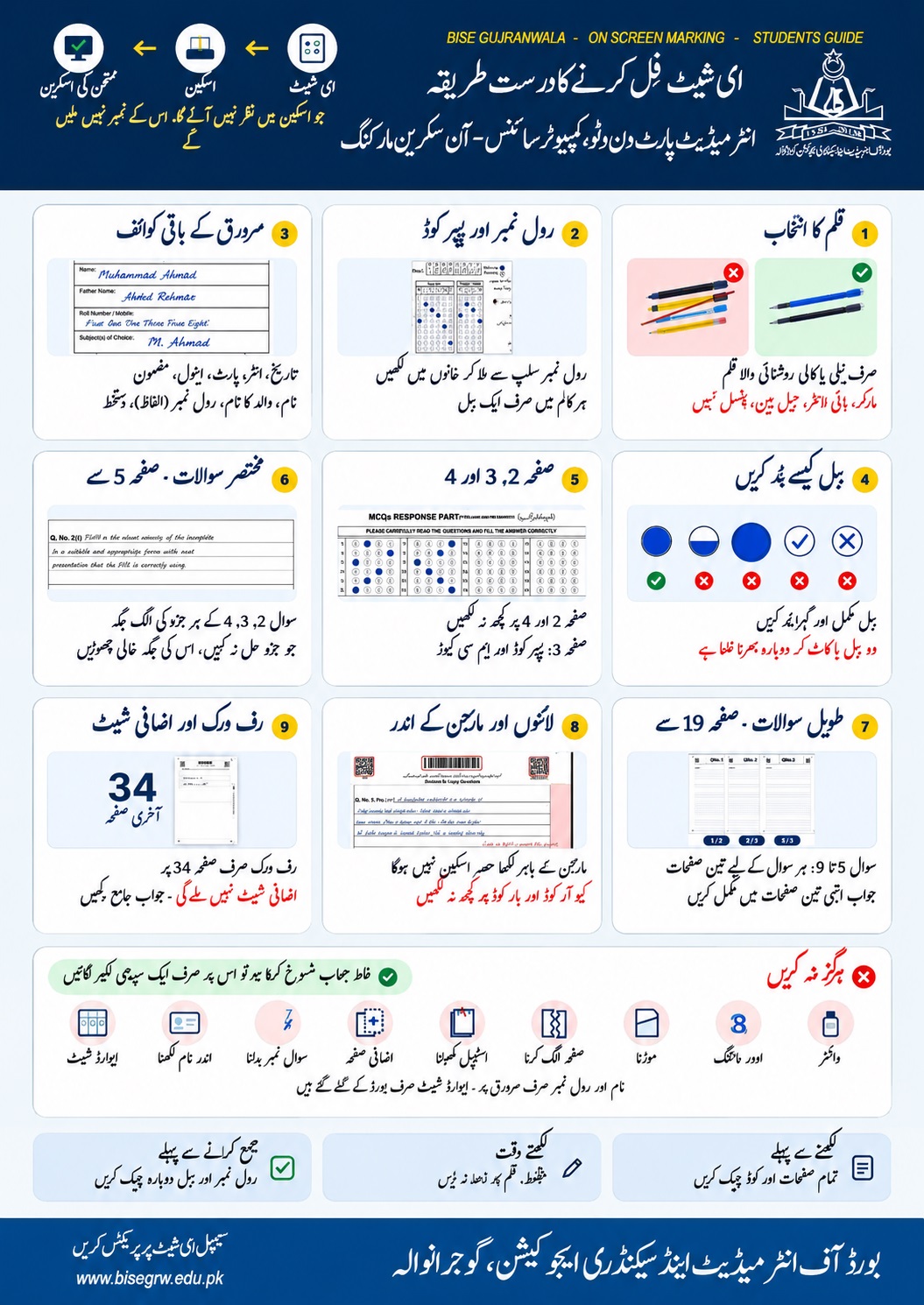
What the BISE Gujranwala guide says (English summary)
The guide above is in Urdu and is made for Intermediate Part 1 and 2 Computer Science on-screen marking. Our English summary of its nine steps:
- Pen: use only a blue or black ink pen. Markers, highlighters, gel pens and pencils are not allowed.
- Roll number and paper code: copy them from your roll number slip into the boxes and fill exactly one bubble in each column.
- Other title-page details: name, father’s name, roll number (in words), subject, date, part and session.
- Filling bubbles: fill the bubble fully and darkly. Half-filled, ticked or crossed bubbles are wrong. Two bubbles, or cutting and refilling, is a mistake.
- Pages 2, 3 and 4: page 3 holds the paper code and MCQ response part. Write nothing on pages 2 and 4.
- Short questions from page 5: each part of Questions 2, 3 and 4 has its own space. Leave the space of a part you do not attempt blank.
- Long questions from page 19: Questions 5 to 9 get three pages each. Complete the answer inside those three pages.
- Lines and margins: anything written outside the margin is not scanned. Write nothing on the QR code or barcode.
- Rough work: only on page 34, the last page. No extra sheet is given.
Never do: use whitener, overwrite, fold the sheet, detach a page, remove the staple, add an extra page, change a question number or write your name inside the copy. Name and roll number go only on the cover page. To cancel a wrong answer, draw one straight line through it.
Three checks: before writing, check all pages and codes; while writing, do not press the pen hard; before submitting, recheck the roll number and bubbles. The guide is for Computer Science; other subjects and boards may use different page numbers.
Source: guide published by BISE Gujranwala for students (bisegrw.edu.pk). English summary and translation by Hira Science Academy.
What is an E-Sheet?
An e-sheet is an ordinary paper answer copy that has been designed for scanning. Compared with a traditional answer book it has:
- a barcode and QR code on every page that identify your copy;
- a title page with boxes for roll number and other details;
- a page of MCQ bubbles, where you shade one bubble per question;
- fixed answer areas for short and long questions, within printed margins;
- a marked rough-work area, and no extra sheets.
Board samples show how these parts are laid out. The BISE Lahore sample for Computer Science (OSM) and the BISE DG Khan specimen each have 34 pages, but your subject and board may differ.
OSM vs. Traditional Paper Checking
In both systems students write by hand. The difference is what happens afterwards.
| Point | Traditional checking | On-Screen Marking (OSM) |
|---|---|---|
| After the exam | Paper copies go to marking centres | Copies are scanned into digital images |
| Examiner sees | The physical answer book | The scanned pages on a computer |
| Who marks | Human examiner | Human examiner |
| What it means for you | Layout is flexible | Each answer must sit in its own area and stay readable after scanning |
OSM is not an online exam. For a board-wise status table see Punjab Board OSM Notifications and Sample PDF.
How Does the OSM Process Work?
- Printing: the board prints answer copies with barcodes and QR codes.
- Attempting: you write the paper by hand inside the printed spaces.
- Collection: the centre staff collect the copy and hand it back to the board.
- Scanning: the board scans every page and links it to your copy through its codes.
- Marking: an examiner views the scan and enters marks on screen.
Anything not scanned, such as writing outside the margins, cannot be seen by the examiner. See Latest Punjab Board OSM Updates for the current status.
Important Instructions Before Filling the E-Sheet
- Carry the permitted pen only. The BISE DG Khan SOP allows a blue or black ink pen and bans red or green ink, highlighters, markers and smudging gel pens.
- Bring your printed roll number slip. Some boards scan its QR code for attendance (reported for BISE DG Khan).
- Do not fold, crease, roll, tear or cut any page, and do not remove the staple or detach pages.
- Keep the copy clean and dry, away from water, sweat, food and liquids.
- Do not press hard. Ink showing through the page makes the other side hard to read after scanning.
- Do not write messages, requests or phone numbers for the examiner.
Step-by-Step Guide to Filling the E-Sheet
Read all printed instructions
Read the instructions on the cover and title page before you write anything. They are the rules for your paper.
Check examination and candidate information
Check that all pages are present, in order and untorn, and that the barcode and QR code on every page are clear. If anything is wrong, tell the invigilator and ask for a new copy before you start.
Write the roll number in the correct boxes
Write your roll number and other required details only in the boxes on the title page, one digit per box, neatly and without cutting. Do not write your name or roll number anywhere else in the copy.
Shade the corresponding roll-number bubbles
If your title page also has bubbles for the roll number or for details such as class, part, session or shift (media reports describe this for some boards; check yours), shade exactly one bubble per entry, completely and darkly, and match it to your roll number slip.
Fill the paper code and other required details
Copy the paper code, subject and any other required detail exactly as printed on your question paper or slip, and only in the places provided.
Fill MCQ bubbles correctly
Fill exactly one bubble per question, completely and darkly, so that the letter inside is covered. You cannot change an answer once a bubble is filled. See the examples below.
Write short questions in their designated spaces
Write each short answer inside its own box. An answer written outside its area may not be marked. Do not copy the question out (reported in the DG Khan poster); write the question number clearly instead.
Write long questions in their designated spaces
Use the pages and boxes printed for each long question. Keep each part in its own space and plan the length so that you do not run out, because no extra sheet is available.
Use the designated rough-work area
Do rough work only in the space marked for it. In the BISE DG Khan and Gujranwala Computer Science copies that area is page 34; in your copy it may differ.
Check the answer sheet before submission
Make sure every MCQ has exactly one filled bubble, nothing is written on the barcode or QR code, and no stray marks or whitener are present. Hand the copy to the invigilator at the end, even if it is blank, and never take it out of the hall.
Common E-Sheet Filling Mistakes
- Ticking, crossing, circling, dotting or half-filling a bubble instead of filling it fully.
- Filling two bubbles for one MCQ, or cutting or overwriting a filled bubble.
- Using whitener or erasable ink anywhere on the copy. Draw one straight line through a wrong written answer instead.
- Writing the roll number or name anywhere other than the title-page boxes.
- Writing, drawing, ticking or scratching on the barcode or QR code, or covering it with ink, tape or stickers.
- Writing outside the margins or on the top and bottom edges, where it is not scanned.
- Using red or green ink, highlighters, markers or smudging gel pens.
- Doing rough work in answer areas or margins instead of the marked rough-work space.
- Folding or tearing pages, or removing the staple.
- Pressing so hard that ink shows through to the other side.
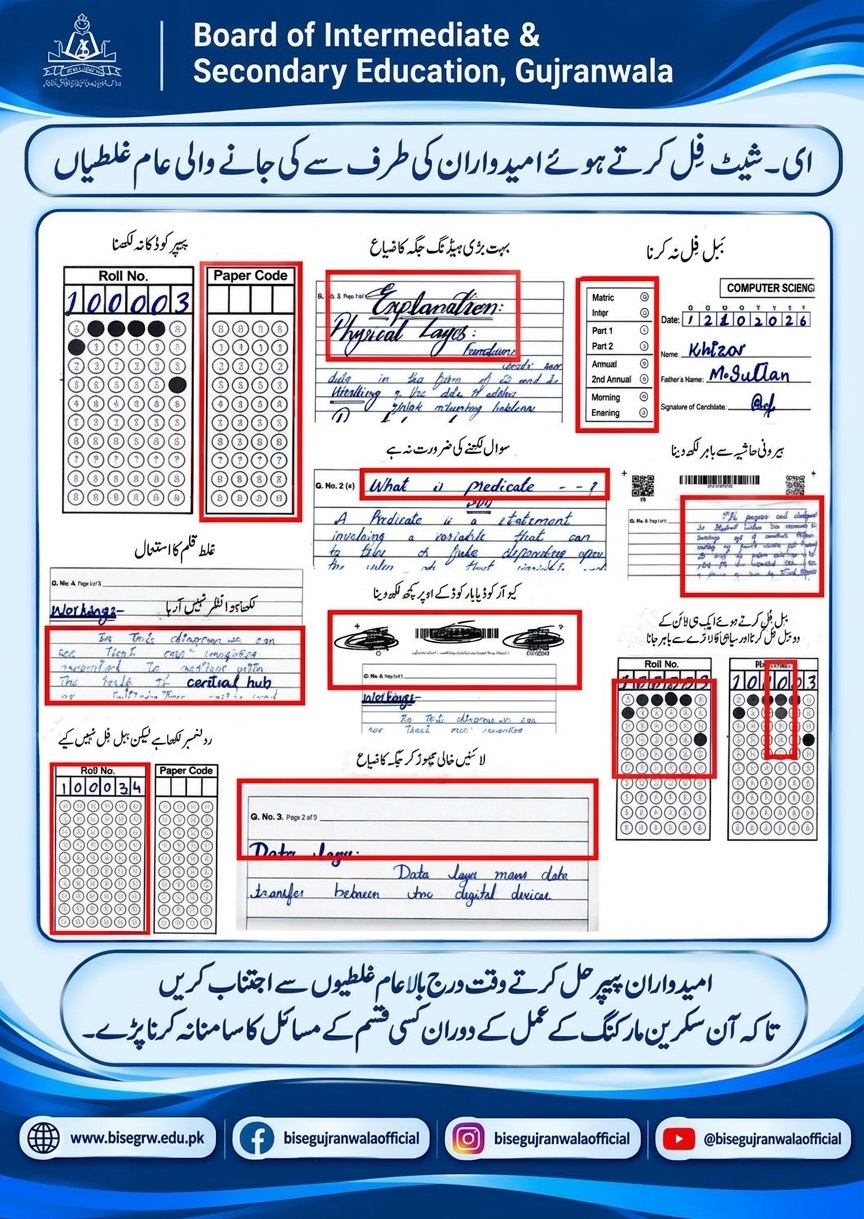
The ten mistakes in the BISE Gujranwala poster (English summary)
- Paper code not written in its boxes and bubbles.
- Very large headings that waste space.
- Bubbles not filled for class (Matric/Inter), part, session (Annual/2nd Annual) and shift (Morning/Evening) on the title page.
- Copying the question when it is not needed.
- Writing outside the outer margin, where it is not scanned.
- Wrong pen, so the ink is faint or not visible in the scan.
- Writing over the QR code or barcode.
- Filling two bubbles in the same column and letting ink go outside the circles.
- Roll number written but its bubbles not filled.
- Leaving lines empty, which wastes space.
The poster closes by asking candidates to avoid these mistakes so there are no problems during on-screen marking. Source: BISE Gujranwala; English summary by Hira Science Academy.
Correct and Incorrect MCQ Bubble Examples
The official instructions list ticking, crossing, circling, dotting and half-filling as unacceptable. These drawings are our own illustration of that rule.
✓ Correct
Fully filled
✗ Wrong
Tick
✗ Wrong
Cross
✗ Wrong
Circled
✗ Wrong
Dot
✗ Wrong
Half-filled
Also wrong: filling more than one bubble, cutting or overwriting a bubble, or using whitener on it. These count as multiple answers and the question gets zero marks. Do not make any mark around the bubbles.
How to Protect the Barcode, QR Code and Scanning Areas
- Never write, draw, tick, underline or scratch on a barcode or QR code, and never cover it with ink, correction fluid, tape or stickers. The SOP warns that a damaged code can affect the marking of your copy.
- Stay inside the printed margins. Text outside them, or on the top and bottom edges, will not be scanned.
- Do not attach extra pages or remove the staple.
- Keep the copy flat and dry: no folds, creases or liquid.
How to Manage Answers Within Fixed Spaces
- Plan before you write. Glance at the space for each question and decide how much to write. No extra sheet will be given.
- Start answering straight away. The DG Khan poster, as reported, advises not copying the question, drawing needless lines or leaving blank space.
- Use short, clear sentences and write at a steady size. Illegible writing may lose marks because the examiner reads it on a screen.
- One answer per space. Do not mix answers to different questions in one area.
- To cancel, draw one straight line through the answer. Do not scribble or use whitener.
Special Instructions for Numerical Questions and Diagrams
- Numericals: write the given data, formula, substitution and final answer in order, one step per line, inside the box. Do the long calculation in the rough-work area first only if it is allowed by your copy, then copy the clean steps.
- Diagrams: decide the size before you draw so the diagram and its labels fit the space. Keep labels outside the barcode and margin areas.
- Pencil or colours: the official SOP we read names only a blue or black ink pen and bans markers and highlighters. It does not say that pencil or coloured pens are allowed for diagrams. Do not assume; check the instructions on your own copy.
- Equations and code: keep each line short and aligned so that nothing runs past the margin.
BISE Sargodha OSM Video
This video was published by BISE Sargodha on social media. It is a BISE Sargodha resource, not a Punjab-wide instruction video, so other boards’ answer copies may differ.
Video source: BISE Sargodha. Confirm all rules against the instructions printed on your own answer copy.
Advertisement
Free Sample E-Sheet PDF Download
Practise on a sample before the exam. This is a practice sample; official board samples are linked below.
📄 Download Your Free Sample E-Sheet PDF
📥 Download Sample E-Sheet PDFFree. Opens from Google Drive.
Official samples: BISE Lahore Computer Science (OSM) · BISE DG Khan specimen · BISE Multan specimen. See also Punjab Board OSM Notifications and Sample PDF.
Board-Wise Instructions and an Important Clarification
Follow the instructions printed on your own examination answer book. Page numbers, pen types and rough-work pages below belong to specific boards, subjects and sample copies. They are not rules for every board.
| Board | What the source says | Source |
|---|---|---|
| BISE DG Khan | Official SOP for candidates (16 rules, 7 Nov 2026): ink pen, one bubble per MCQ, no extra sheet, rough work only where marked. Student poster (as reported): MCQs on page 3, nothing on pages 2 and 4, rough work on page 34 of a 34-page Computer Science copy. | SOP PDF |
| BISE Lahore | Official sample: 34-page Computer Science (OSM) answer book and bubble sheet pattern. Printed rules not extracted. | Sample PDF |
| BISE Gujranwala | Student guide published by BISE Gujranwala for Computer Science (shown above): blue or black ink pen, no gel pens, markers, highlighters or pencils; MCQs on page 3, nothing on pages 2 and 4; short questions from page 5; long questions 5 to 9 from page 19, three pages each; rough work on page 34; no extra sheet. A second poster shows common mistakes. | Guide image Mistakes poster ProPakistani report |
| BISE Rawalpindi | Reported to have published the same 16 rules for the Computer Science Part-I digital copy. Not verified on the board site. | Pakistan Era report |
| BISE Multan | Specimen answer sheet for Computer Science (2nd Annual 2026) posted 28 Oct 2026. Printed instructions not extracted. | Specimen |
| BISE Sargodha | Video resource used in this guide. Written instructions not verified. | Video above |
| BISE Faisalabad, Bahawalpur, Sahiwal | No specific official e-sheet instructions verified. | — |
For the confirmed OSM status of each board see the board-wise table in our OSM overview.
Frequently Asked Questions
Read the printed instructions, check that every page and barcode is clear, write your roll number and details only in the title-page boxes, fill one MCQ bubble completely and darkly with the permitted pen, write each answer inside its own space, do rough work only in the marked area, and hand the copy back at the end.
An e-sheet is a printed answer copy designed for scanning. It carries a barcode and QR code on each page and has fixed areas for MCQ bubbles and written answers. After the exam it is scanned and the examiner marks the scanned pages on a screen.
Write your roll number and other required details only in the boxes on the title page. If your copy also has bubbles for the roll number or other details, shade exactly one bubble for each entry, fully and darkly, and check it against your roll number slip. Do not write your roll number anywhere else.
Fill exactly one bubble per MCQ completely and darkly with a blue or black pen so that the letter inside is covered. Do not tick, cross, circle, dot or half-fill a bubble, and do not make marks around the bubbles.
No. The official candidate instructions published by BISE DG Khan say an answer cannot be changed once a bubble is filled. Cutting, overwriting, using whitener or filling more than one bubble counts as multiple answers and the question gets zero marks.
BISE DG Khan's published instructions say to use only a blue or black ink pen and not to use red or green ink, highlighters, markers or gel pens that smudge. BISE Gujranwala's student guide also says blue or black ink pen and rules out markers, highlighters, gel pens and pencils. Follow the instructions printed on your own answer copy.
No. The official instructions say no extra or supplementary sheet will be attached. Plan your answers to fit the pages provided, and do not remove the staple or add pages.
Only in the space marked for rough work on your own answer copy. In the BISE DG Khan and BISE Gujranwala Computer Science copies that space is page 34, but this is not a universal rule; check your copy.
The official instructions say anything written outside the margins, or on the top and bottom edges of the page, will not be scanned and will not be marked. Answer each question only in its designated area.
No. Page numbers, pen types and rough-work pages in this guide come from specific board samples and notices. Follow the printed instructions on your own board's answer copy for your subject.
Use the download button in the sample section of this page. Official samples are also posted by BISE Lahore (Computer Science OSM answer book), BISE DG Khan and BISE Multan.
Related Educational Resources from Hira Science Academy
OSM System Punjab Boards 2027
Official status, board-wise table and sample e-sheet.
Read →Class 9 & 10 Pairing Scheme 2027
Chapter-wise marks distribution for Punjab boards.
Read →Class 10 Notes
Free notes for Mathematics, Physics, Chemistry, Biology and Pakistan Studies.
Read →Class 9 Notes
Free notes for all Class 9 subjects.
Read →5 Common Math Mistakes to Avoid
Errors that cost marks in algebra and geometry.
Read →How to Solve Physics Numericals
Step-by-step method for board-pattern numericals.
Read →Sources checked on 8 November 2026
Candidate rules: BISE DG Khan “SOPs for Candidates” PDF (official). Gujranwala details are read from the board's own guide image shown above; DG Khan page numbers come from media reports of its poster: Pakistan Era and ProPakistani. We could not read the DG Khan poster image directly. Full source list: OSM overview sources.
About the author
Muhammad Tayyab
SSE (Mathematics) | MSc Mathematics
Govt. Christian High School Daska | Hira Science Academy
Muhammad Tayyab is a Senior Subject Expert (SSE) in Mathematics with over 10 years of teaching experience. He is also the founder of Hira Science Academy.
✍️ Written on 8 November 2026 using board websites and press reports; not an official board publication.